How to take payments on WhatsApp (without sending a separate link)
A client messages you. You spend twenty minutes in conversation. They are interested, they ask the right questions, they say yes. You send a payment link.
And then nothing.
Not a decline, not a complaint — just silence. The moment passed. The link sits unopened. You follow up two days later. Sometimes they come back. Often they do not.
This is not a client quality problem. It is a friction problem. Pasting a raw payment link into the chat pulls the person out of the conversation that built the intention to pay, disconnects the payment from everything else you track, and leaves you to reconcile it by hand. That combination breaks the momentum at exactly the wrong moment.
There is a better way — and it does not require a new tool, a separate checkout page, or a link you copy and paste yourself.
Why a pasted payment link creates drop-off
When you paste a Stripe link or a payment page URL mid-conversation, you are asking the client to:
- Notice and trust a bare URL dropped into the chat
- Tap it and wait for a page to open
- Find their card
- Pay
- Come back to WhatsApp and tell you it is done
Each of those steps is a micro-decision. Most of the time the client completes them. But at the margins — when they are on the move, when something interrupts them, when the link looks like spam — those steps are where the sale quietly disappears. And on your side, you are left checking Stripe to see whether it went through.
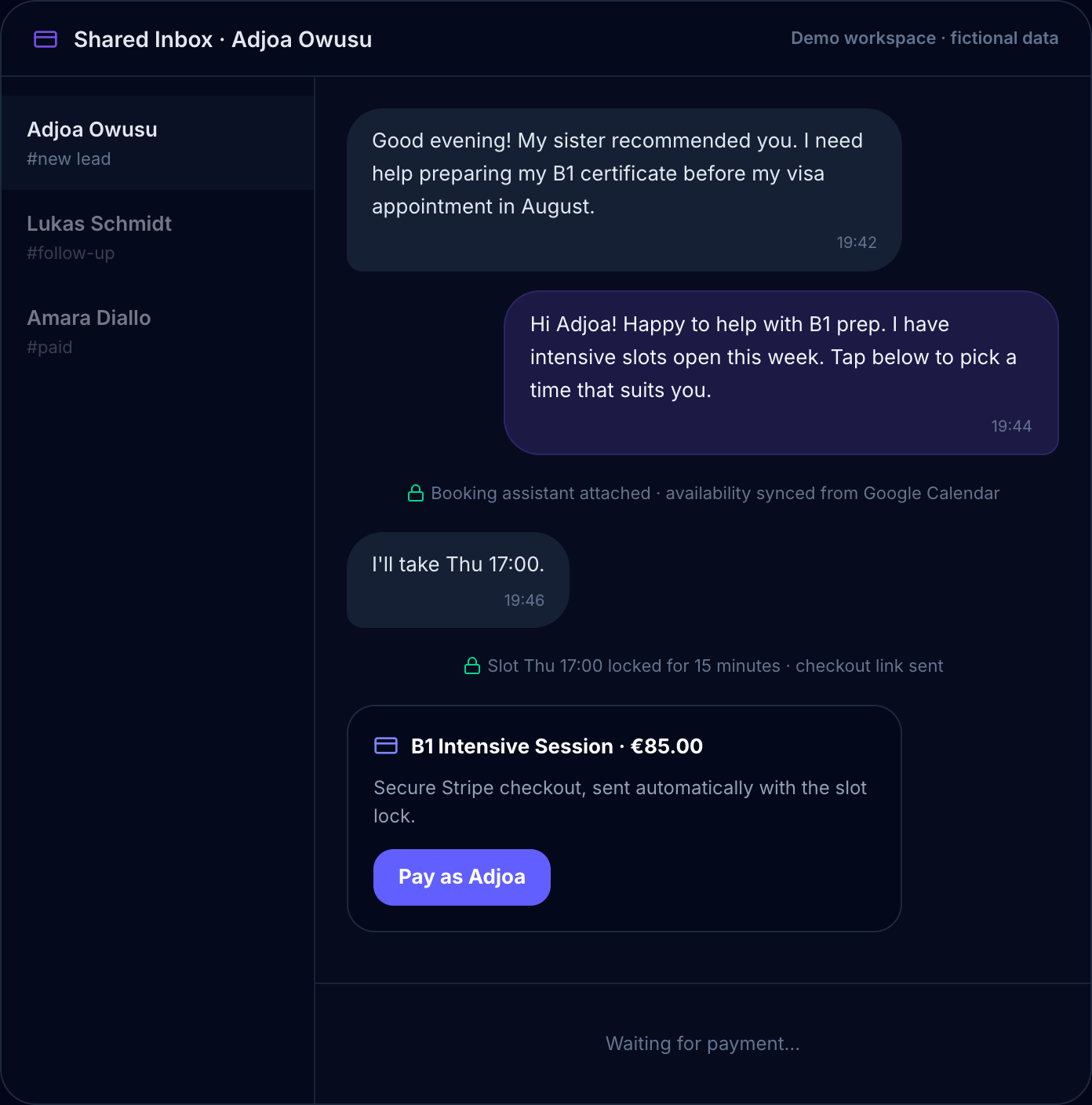
Compare that to a checkout that is part of the conversation: they tap one clearly labelled button, pay on a secure page, and the confirmation lands back in the same chat — with the paid status recorded against the booking automatically. No link to find in a message, no invoice buried in email, no wondering whether it went through.
How in-chat payment actually works
The WhatsApp Business Platform lets a business send interactive messages — including a tap-to-open checkout button — directly in the conversation, rather than a bare URL pasted into a message.
Here is the honest mechanics of it. When a client is ready to pay, the tool generates a secure Stripe checkout and attaches it to the chat as a labelled payment button. The client taps it, Stripe's secure checkout page opens, they pay, and a confirmation message lands back in the same WhatsApp thread — with the payment status updated against the booking automatically.
The card details themselves are entered on Stripe's own secure, PCI-compliant page, as they should be — no serious tool handles raw card numbers itself. What changes is everything around that step: the request is triggered at the right moment inside the conversation, it takes a single tap, and the result flows straight back into the thread and your inbox. You are not pasting a link, and you are not reconciling a payment by hand.
What the Chatydesk payment flow looks like in practice
Chatydesk integrates directly with Stripe. When you are ready to collect payment from a client — at the end of a booking flow, at the end of a consultation, at the point of a sale — a checkout button goes out inside the WhatsApp conversation.
The practical flow:
For a coaching session or call: The client picks a slot from your calendar in WhatsApp, a checkout button appears right after, one tap opens Stripe's secure page, and once they pay the booking confirms in the same thread — usually in under two minutes.
For a digital product or course: You share the product in conversation. When the client is ready to buy, the checkout button goes out in the chat. One tap, they pay on Stripe's page, and it is done — no external store to build, no separate link to copy.
For a deposit or part-payment: Same flow. You set the amount, the checkout button goes out in the chat, they pay what is due, and the rest is tracked automatically.
In all three cases, the transaction and the conversation live in the same place. You do not need to cross-reference a Stripe dashboard against a WhatsApp chat to know who has paid and who has not.
What this replaces
Most coaches and creators who run their business through WhatsApp have built a payment workflow out of separate parts: the conversation is in WhatsApp, the payment request goes out as a Stripe link pasted into a message, the confirmation comes from Stripe's email, the client's payment status lives in a Stripe dashboard you check separately.
Getting a single client from "I'm in" to "confirmed and paid" means touching at least three different systems. Then when you need to check whether a client has paid before a session, you open Stripe. When you need to remind someone who hasn't paid, you go back to WhatsApp and write a message. When the payment arrives, you update your CRM or spreadsheet manually.
Chatydesk puts all of that in one place: the conversation, the booking, the payment, and the full client history — bookings made, amounts paid, messages exchanged — logged in a single inbox. You check one thing, not three.
The cost question
Chatydesk is €39 per month for the full platform, self-managed, with your WhatsApp number and two team seats, and the booking and Stripe payment flows included. Chatydesk takes 0% of your customer payments — there is no per-contact fee and no per-transaction platform surcharge beyond Stripe's standard processing rate. Two costs are billed separately by the companies that charge them, not by Chatydesk: Stripe's normal card fee, and Meta's charge for certain business-initiated WhatsApp messages. If you need more seats or numbers, the Launch and Managed tiers add them.
Most tools that automate WhatsApp do not handle payments at all — they are chatbot platforms. The ones that do handle payments typically add a payment module on top of a base subscription, or take a percentage on transactions above Stripe's fee. Chatydesk does neither: the booking-and-payment workflow is part of the €39 plan, at 0% platform fees.
What changes when payment is part of the conversation
The most direct effect is conversion: clients who say yes and are handed a checkout immediately, inside the conversation where they said yes, are more likely to complete the payment than clients who receive a link and have to find their way to a separate page later.
The less obvious effect is on your time. When you are not chasing unpaid links, not reconciling Stripe against WhatsApp, not writing separate follow-up messages for people who "forgot" to pay — the administrative layer of running your business shrinks considerably.
The intent is there when the conversation is happening. Collecting payment in the same moment, in the same thread, is how you capture it.
Frequently asked questions
Can I collect payments directly in a WhatsApp conversation?
Yes. With a tool built on the WhatsApp Business API, a secure checkout button can be sent inside the chat at the moment a client is ready to pay. They tap it, pay on the secure checkout page, and the confirmation lands back in the same thread — instead of you pasting a payment link or emailing an invoice.
Does the client enter their card details inside WhatsApp?
No — and no reputable tool handles card numbers itself. The card details are entered on Stripe's own secure, PCI-compliant checkout page, which opens with one tap from the chat. What changes is the timing and the plumbing: the request is triggered in the conversation and the paid status flows straight back into your inbox.
What does Chatydesk charge on payments?
Chatydesk takes 0% of your customer payments — there is no platform surcharge beyond Stripe's standard processing fee. The €39/month subscription covers the booking and payment flows; Stripe's card fee and Meta's per-message fees are billed by those companies, not by Chatydesk.
Do I need a separate checkout page or online store?
No. The checkout is generated and attached to the WhatsApp conversation automatically, so there is no separate store to build and no payment link to copy and paste. The booking, the payment, and the client history all live in one inbox.