Embed your WhatsApp booking widget on your website
Someone lands on your website, likes what they see, and wants to book a call. What happens next usually goes one of three ways. Your site has no booking at all, so they have to message you cold on WhatsApp and wait for a reply. Or you've bolted on a standalone booking widget that works fine on its own — except it has no idea what you've already booked through WhatsApp, so a client messages you for a slot that's technically still "open" on your website and now you're double-booked. Or you're paying for and maintaining a separate scheduling tool that was never built to talk to the WhatsApp bot your business actually runs on.
None of those are great. The booking-embed feature that just shipped in Chatydesk is built to fix exactly this: an embeddable booking widget you paste onto your own site, running on the same booking engine as your WhatsApp bot.
What embedding actually means
An embed is a small snippet of code — a script tag plus a target element — that you paste into your website's HTML. When the page loads, that snippet renders a live booking page: pick a service, pick a time, enter your details, done. Nothing to build, no separate app your visitors have to navigate to.
The part that matters is what sits behind it. A generic embeddable calendar only knows about bookings made through itself. Chatydesk's embed reads and writes against the same availability engine as your WhatsApp bookings, so the two channels are never out of sync with each other.
How the Chatydesk booking flow works
Set it up from the dashboard
In Dashboard → Booking settings, there's a Website Embed card. To turn it on:
- Pick a public slug for your booking page (this becomes part of the URL visitors land on).
- Add at least one offering. Free offerings and offerings priced through Stripe are bookable directly from the web. Manual, PayPal, or other custom-payment offerings show a "Book via WhatsApp" link instead, since there's no way to collect that kind of payment on a public page.
- Toggle the embed on.
Paste the snippet
Chatydesk gives you one <script src="https://chatydesk.com/embed.js" async></script> tag, plus a target element depending on how you want it to appear:
- Inline:
<div data-chatydesk-embed="your-slug"></div>replaces itself with a self-sizing iframe wherever you place it on the page. - Popup: add
data-chatydesk-mode="popup"to any button or link, and clicking it opens the booking page in a centered popup window. - Floating button: a fixed "Book now" button that slides in an iframe panel. It needs no placeholder element — just the script tag.
This works anywhere you can paste a custom embed snippet: plain HTML, React, WordPress, Wix, Squarespace, whatever your site runs on.
What the visitor sees
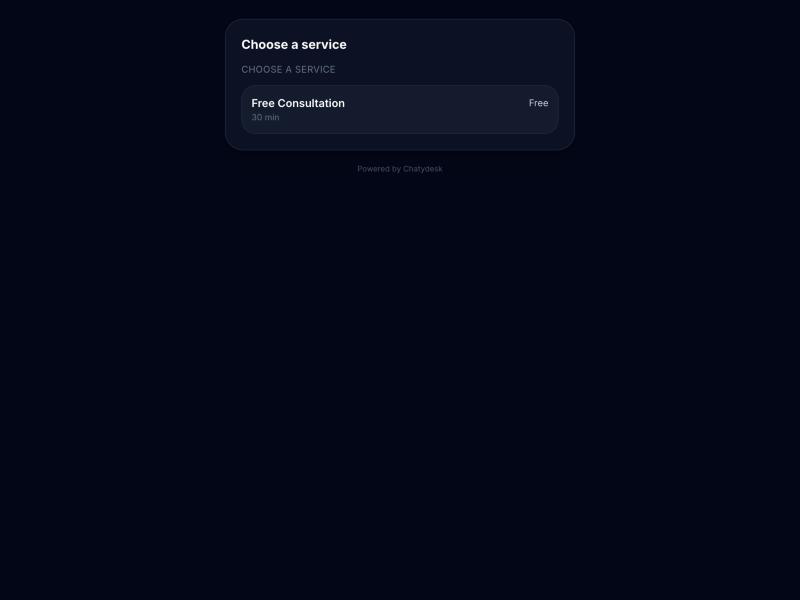
A visitor picks an offering, then picks a time slot. Their own browser timezone is auto-detected and shown alongside your business timezone, so there's no "wait, is that my time or yours" confusion. They enter their name, phone, and email. Free bookings confirm instantly; paid ones open Stripe Checkout in a popup. Either way, they land on a done screen with their calendar details.
The offering picker on the live demo embed — pick a service, see its price and duration.
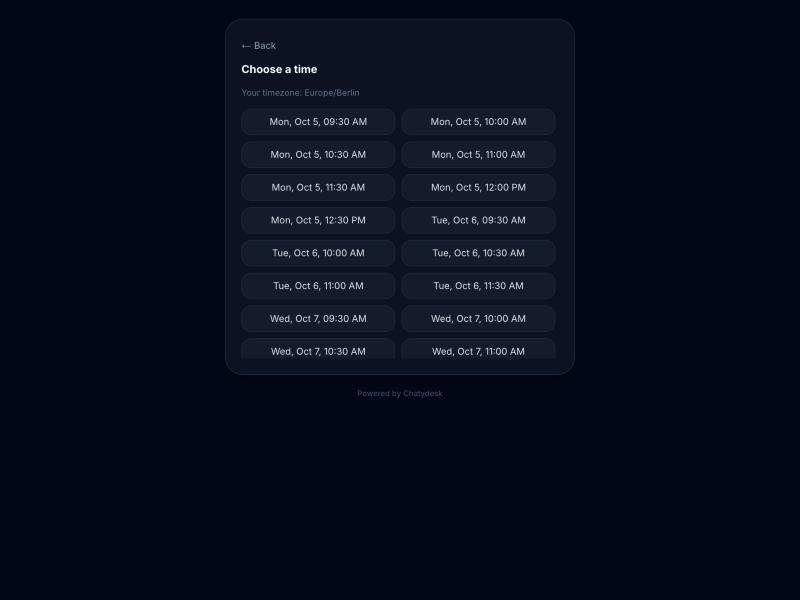
After picking a service, visitors see real open slots in their own timezone. (Live demo at chatydesk.com/embed/chatydesk-demo.)
No account, no login, nothing for your website to manage. The embed page carries no session state of its own — it just talks to Chatydesk.
The part a standalone booking embed can't do: no double-booking across channels
This is the actual differentiator, so it's worth being specific about it. A standalone embeddable calendar only knows about events made through itself. If your business also takes bookings through a WhatsApp bot, as covered in how to book calls from WhatsApp without the back-and-forth, you now have two calendars that don't talk to each other. Someone books 2pm Tuesday on your website; five minutes later, someone else books the same 2pm Tuesday slot through WhatsApp, because the WhatsApp bot has no idea your website just took it. You find out when you're double-booked.
Chatydesk's website embed and its WhatsApp bot aren't two systems that sync — they're the same system. Both write bookings through the exact same createBookingHold() function, against the same bookings table and the same availability engine. There is no separate inventory for "web bookings" and "WhatsApp bookings." A hold or a confirmed booking from either channel blocks that slot everywhere, immediately. Whichever channel a client books through first wins the slot, and the other channel simply won't offer it anymore.
That's the guarantee a generic standalone embed can't make unless it's also your WhatsApp bot — because keeping one shared calendar across every channel a client might use to reach you is the whole point of a booking engine, not an add-on feature.
Try it
If you already run your client bookings through Chatydesk's WhatsApp flow, turning on the website embed takes a few minutes from Dashboard → Booking settings, and it uses the offerings you've already set up. See it running on a live offering at chatydesk.com/embed/chatydesk-demo, or check pricing if you're not on Chatydesk yet.
Frequently asked questions
Do visitors need to log in or have WhatsApp to book on my website?
No. The embed page carries no account or session state. A visitor picks an offering and a time slot, enters their name, phone, and email, and books — no WhatsApp message required and no login for them or for your website.
Can a slot get double-booked between my website and WhatsApp?
No. Both the website embed and the WhatsApp bot write bookings through the exact same createBookingHold() function against the same bookings table — there is no separate inventory for the two channels. A hold or confirmed booking on either one blocks that slot everywhere immediately.
Can I take payments through the embedded widget?
Only for offerings priced via Stripe, or offerings marked free. Manual, PayPal, or other custom-payment offerings aren't bookable from the web widget — they show a "Book via WhatsApp" link instead, since there's no way to collect that payment type on a public page.
Will the embed work on Wix, Squarespace, or WordPress, or only custom code?
It works on any platform that lets you paste a custom HTML/script snippet, including WordPress, Wix, Squarespace, and plain HTML or React sites. There's nothing to install beyond pasting the snippet.
Does the visitor get a confirmation if they book for free?
Yes, free-offering bookings confirm instantly. If you have Google Calendar connected, the visitor's email is added as a guest on the event, so they get a calendar invite with a join link. No WhatsApp message is sent to them, since they may not have messaged you on WhatsApp at all.